
4G Picture Button Cell Phone for Seniors with SOS Button
Couldn't load pickup availability
PLEASE NOTE: This phone currently will NOT connect to the 2degrees network.
✅ In Stock & Ready to Ship
Looking for a phone that works on most NZ networks including 2degrees?
The 4G Big Button Mobile Telephone (Great for Care Homes) is available now — supports Spark, One NZ, and 2degrees. 10 units in stock, priced at NZD $279.
View In-Stock Alternative →Make it Easiest-to-Use
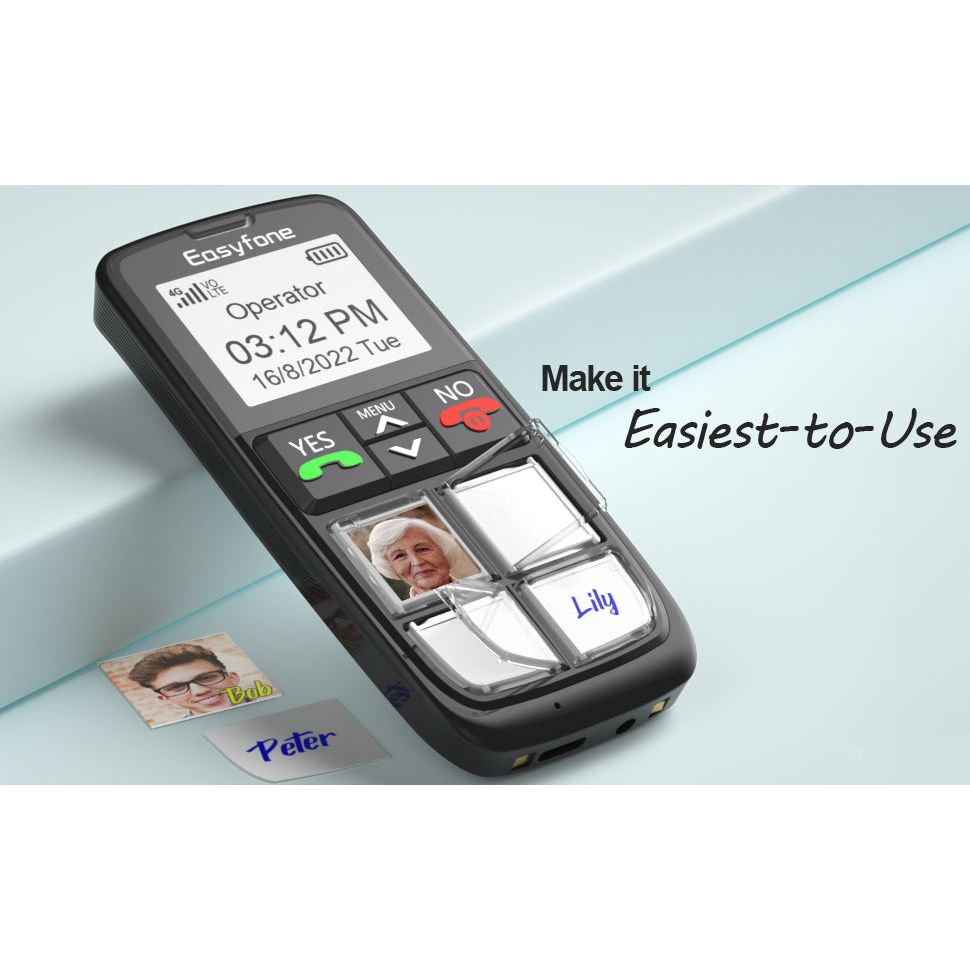
Easyfone is a 4G VoLTE simplest cell phone. The phone has 4 unique large picture buttons which are convenient for making calls. Clear Sound and Big battery, long time standby with simplest operating system. Improved Screen Technology has been designed to be senior user-friendly. Now includes a contacts page to store numbers other than the 4 Picture Buttons. It's a perfect phone for advanced aged, elderly, people with Dementia or Alzheimer's.
|
![]() |
![]() |
![]() |
![]() |
![]() |
Easiest-to-Use | Large Picture Buttons | Cradle Charger | SOS Button
Special Design for Advanced Age, Elderly, Dementia, Alzheimer's
- Directly call your loved ones via 4 picture buttons, without searching through a phonebook.
- Powerful speaker with clear and loud sound, suitable for older users; HAC Compatible, good for users with hearing aid devices.
- 1050mAh real capacity battery, long time standby with an easy cradle charger.
- Emergency SOS button, For help in case of emergency.
Memory Loss & Difficulty making phone calls?
When we set out to create an accessible Cell phone for people with memory loss, it was necessary to us that we consult the community. Through lengthy feedback and collaboration with people living with memory loss, we developed a unique personal cellphone device that does more simply than a regular senior cell phone; after helping to complete the basic settings, the user can use it independently.
Note: This phone is designed solely for making calls; it does not support texting. While it can dial out to various numbers, its main function is to establish a reliable call connection for up to four close contacts, such as family and friends.
It is advisable to select a prepay Sim card either 1mth or 12mth from above as you will not be able to activate a new sim card from this phone, you will require another phone that can accept texts to do the activation process. If, however, you have an existing sim card that has already been working, this will work in the Easyfone, simply swap them over.
PLEASE NOTE: This phone currently will NOT connect to the 2degrees network for calling.
Share

Ok, a bit plasticier than I was expecting, does the job
Grandpa has regained some freedom and confidence with this easy to use phone. It’s perfect for elderly fingers that have become less dexterous, and simple to use even when the mind fades in and out. Highly recommended.
Excellent. Ideal for my parents. Thank you.
Does exactly what it says it does. Friendly communication
This was the simplest phone I could find for my elderly father. Simple to operate as no swiping involved and only 4 essential contacts on the phone. Super easy to turn on but slightly more complex to turn off which is its only downside, other than that I highly recommend.
- 5 stars: 6 (46%)
- 4 stars: 3 (23%)
- 3 stars: 4 (31%)
- 2 stars: 0 (0%)
- 1 star: 0 (0%)
Ok, a bit plasticier than I was expecting, does the job
Grandpa has regained some freedom and confidence with this easy to use phone. It’s perfect for elderly fingers that have become less dexterous, and simple to use even when the mind fades in and out. Highly recommended.
Excellent. Ideal for my parents. Thank you.
Does exactly what it says it does. Friendly communication
This was the simplest phone I could find for my elderly father. Simple to operate as no swiping involved and only 4 essential contacts on the phone. Super easy to turn on but slightly more complex to turn off which is its only downside, other than that I highly recommend.
So far it's been really good. It'sthe first time my Dad has been positive about having a phone. Nice to have a non-touchscreen - Dad's fine motor control isn't there anymore so the big buttons help. The only drawback has been the sound quality- it's pretty rough. The phone defaults to speakerphone which is good, but the phone's mic picks up the speakers so the person calling hears it repeating what they say.
Its ok, the volume could be louder and it should be able to take international numbers like the +64
Good responses from Eldertech - thanks Product is as described - a very basic and easy to use phone for the technically challenged. However, I cannot figure out an easy way to enter names that appear on the screen when using the picture buttons (I had to enter them on another phone after transferring the SIM card). And I cannot find a phonebook function - perhaps it does not exist. These make it a poor solution for a person who wants just a little more than four contacts. Mike
Perfect for my elderly dad, very easy to use and he loves it!
Excellent prompt service, phone is wonderful
purchased this phone for my mother who is vision impaired easy to set up and use my only criticism is that you can't turn the phone off without going into the menu - which my mum can't do, so the phone has to stay turned on all the time the lock feature is good and needs to be put on the online info about the phone
The phone is ok. There are a few things that I think could make it even better. 1: you can put your own simcard in the phone, so you keep your own number. However there is no option so see the numbers on your simcard. So before you swap phones you have to write the 4 names and numbers down and manually add them to the buttons. It would be great if it would be possible to pick this from your own simcard. Since I didn't save my own number on the sim when installing the phone for my uncle in law, I can't judge if someone's name who has been saves on the dim will show when receiving a call. I would hope it is. 2. The loudspeaker isn't the clearest. Also depending on the person who's on the other side ofcourse. But I did notice that the loudspeaker had a rasp/ noise compared to having a call without the speaker on. This is something I would invest in a little bit more, especially when the eldery have trouble with their ears. 3. The unlock button is on the side and is a little slide up/ slide up button. Yes good, so the person can't make a pocket call. However this button is small, the symbols small and for someone who's loosing strength it's hard to slide it up or down. All the buttons are big so he can see easy, but the little padlock is very very small. So he kept getting confused if up is unlock or down is unlock? And he wasn't able to put his finger on properly to be able to put enough pressure to slide it up. So now we just don't lock the phone, too confusing for him because by the time he's holding it sideways he's using more strength to keep the phone up, while trying to put pressure on that button so it slides. When he get it up he's grip will push the front buttons to operate the phone. Then he panics because he doesn't know what button he pressed and the phone now is doing its own thing.
Brought for my 95 yr old father who loves it. It has allowed him to get his independence back. Very easy to set up and to use.


